Connecting BetterDB to Upstash
Upstash is a serverless Redis/Valkey provider. It uses the standard Redis wire protocol on port 6379 with TLS, so BetterDB connects to it directly - no agent required.
Prerequisites
- An Upstash account with at least one Redis or Valkey database created
- BetterDB Cloud workspace, or self-hosted BetterDB
Finding Your Connection Details
- Open the Upstash Console
- Select your database - you land on the Details tab by default
- At the top of the Details tab, find the connection info block showing Endpoint, Token / Readonly Token, Port, and TLS/SSL:
- Endpoint - click TCP to see the hostname, e.g.
your-db.upstash.io - Token - click TOKEN to copy it - this is your password
- Port -
6379 - TLS/SSL -
Enabled(always required)
- Endpoint - click TCP to see the hostname, e.g.
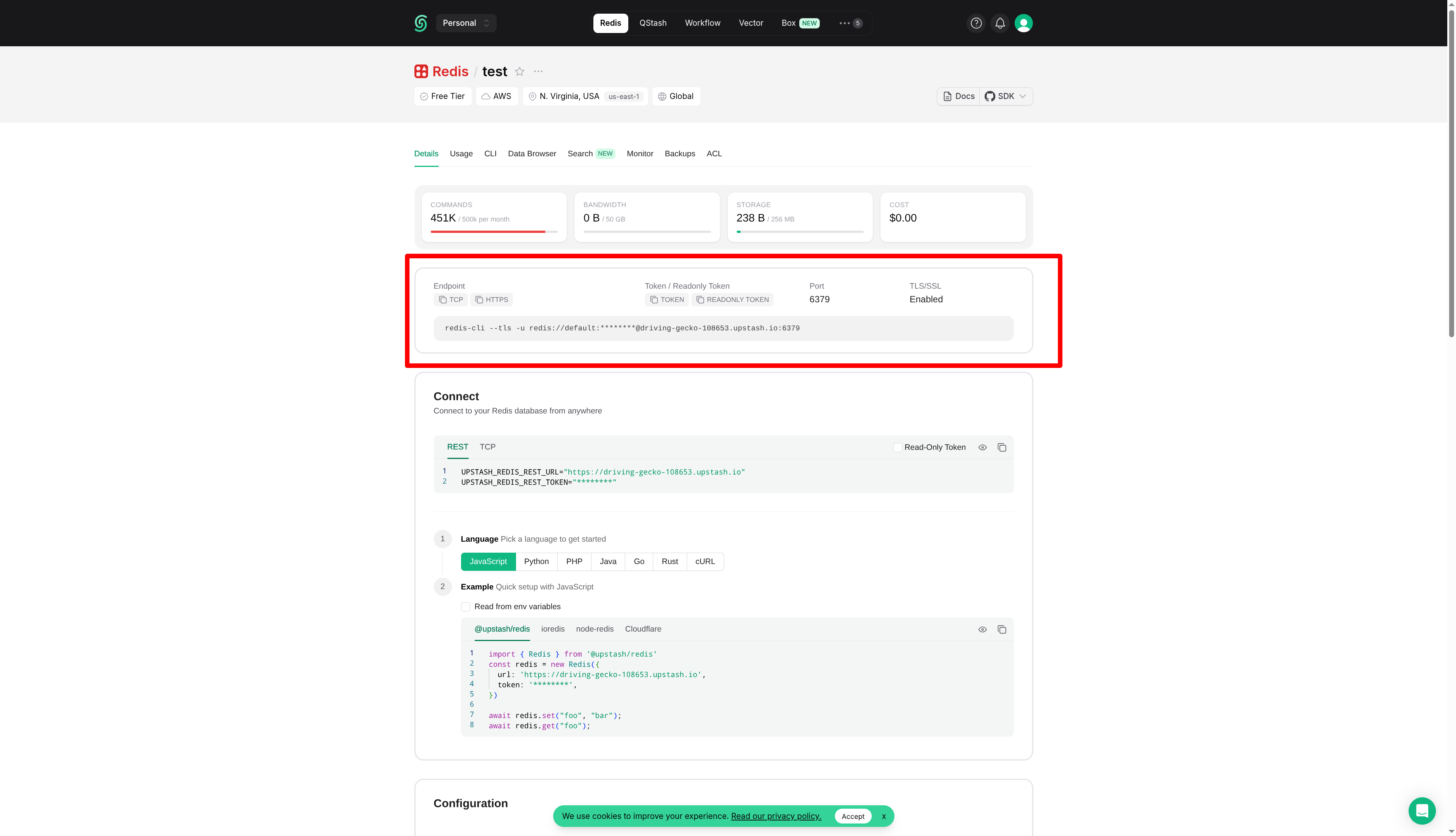
The Connect section further down the page shows
UPSTASH_REDIS_REST_URLandUPSTASH_REDIS_REST_TOKEN- these are for the HTTP REST API and will not work with BetterDB. Use the Token from the top block instead.
Quick Connect
The fastest way: build a connection URL from your Details tab values and paste it into the Quick connect box on the connect screen:
rediss://default:YOUR_TOKEN@your-db.upstash.io:6379
Use rediss:// (double s) - Upstash always requires TLS. YOUR_TOKEN is the Token from the top connection block, not the REST token.
Connecting via BetterDB Cloud
Direct connection works because Upstash exposes its endpoint publicly on port 6379.
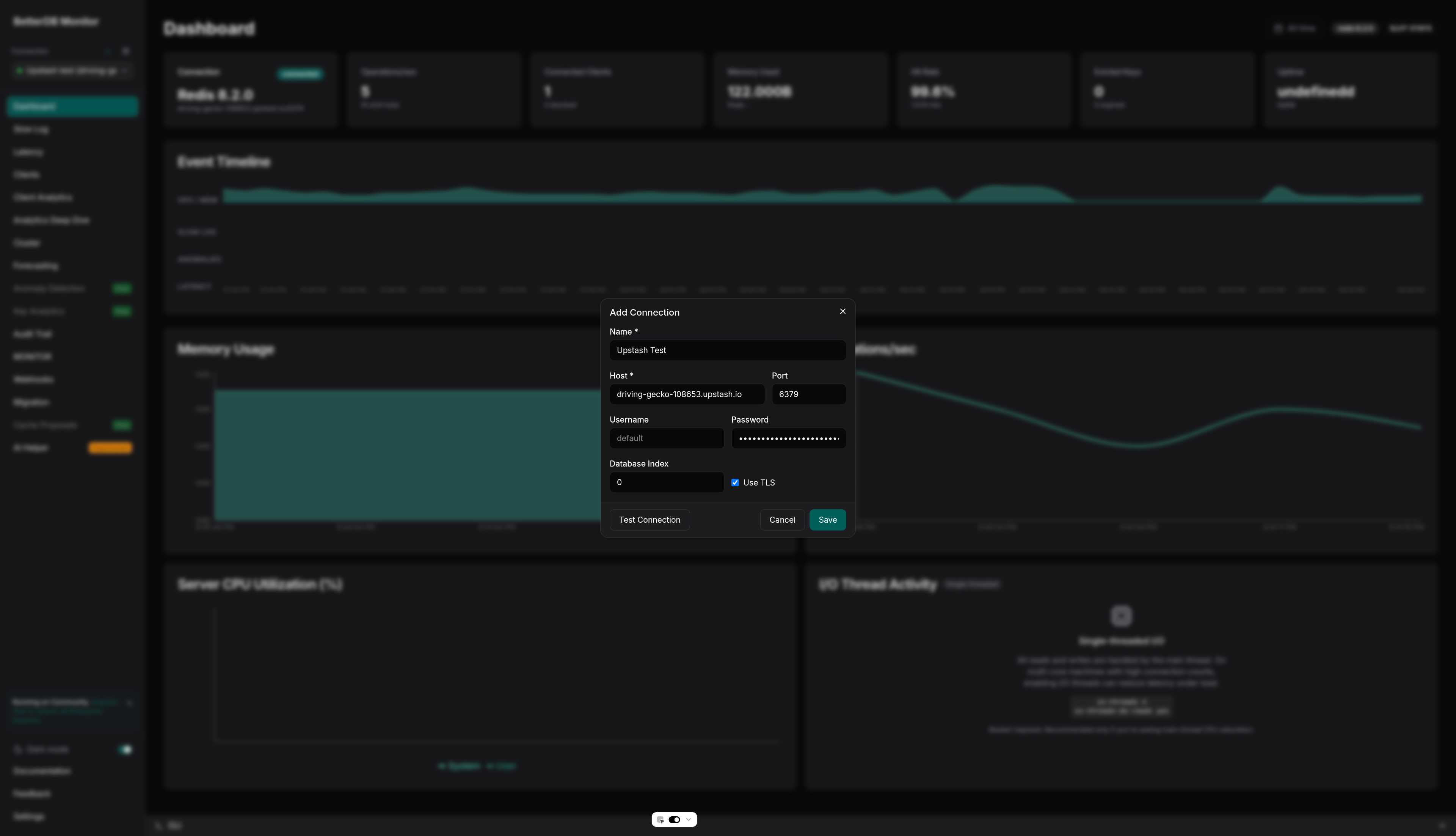
- In BetterDB Cloud, open the connection selector and click + Add Connection
-
Fill in the form:
Field Value Host your-db.upstash.ioPort 6379Password Your Upstash Token (from the Details tab top block) Username (leave blank or default)Use TLS ✅ Enabled - Click Test Connection, then Save
Connecting Self-Hosted BetterDB
Via environment variables (initial connection)
docker run -d \
  --name betterdb \
  -p 3001:3001 \
  -e DB_HOST=your-db.upstash.io \
  -e DB_PORT=6379 \
  -e DB_PASSWORD=your-upstash-token \
  -e DB_TLS=true \
  -e BETTERDB_LICENSE_KEY=your-license-key \
  betterdb/monitor
Via API (additional connections)
curl -X POST http://localhost:3001/connections \
  -H "Content-Type: application/json" \
  -d '{
    "name": "Upstash Production",
    "host": "your-db.upstash.io",
    "port": 6379,
    "password": "your-upstash-token",
    "tls": true
  }'
What Works on Upstash
| Feature | Status | Notes |
|---|---|---|
| Memory & CPU metrics | ✅ | Via INFO command |
| Key count, ops/sec, hit rate | ✅ | Via INFO |
| Slowlog | ✅ | Available on all plans |
| Key analytics (SCAN) | ✅ | SCAN is supported |
| Anomaly detection | ✅ | Based on INFO polling |
| Webhooks & alerts | ✅ | |
| Migration (source or target) | ✅ | All data types supported |
| MONITOR stream | ✅ | Supported by Upstash |
| Client analytics | ✅ | CLIENT LIST is supported |
| ACL audit trail | ⚠️ | ACL LOG availability varies by plan; the audit tab may show no entries |
| CONFIG inspection | ❌ | CONFIG GET/SET is not available on Upstash |
| COMMANDLOG | ❌ | Valkey-only feature; not available on Upstash Redis |
BetterDB detects unavailable commands automatically - restricted panels show an explanation rather than an error.
Feature availability on managed providers changes frequently. Always consult the Upstash documentation for the most up-to-date information on supported commands.
Known Limitations
Single database only. Upstash does not support multiple Redis databases (SELECT 1, SELECT 2, etc.). All data lives in database 0. BetterDB always connects to database 0 by default, so this is not an issue unless you explicitly set a different database number.
No CONFIG access. Upstash does not allow CONFIG GET or CONFIG SET. The configuration panel in BetterDB will be unavailable for Upstash connections.
Troubleshooting
| Symptom | Cause | Fix |
|---|---|---|
Connection refused on port 6379 | TLS not enabled | Enable Use TLS in the connection form |
WRONGPASS invalid username-password pair | Wrong token | Use the Token from the top connection block on the Details tab - not UPSTASH_REDIS_REST_TOKEN from the Connect section below |
ERR unknown command 'CONFIG' | Upstash blocks CONFIG | Expected - BetterDB handles this automatically |
| Dashboard panels show “Unavailable” | Command restricted by Upstash | Expected - see the feature table above |
| Slowlog is empty | No slow queries yet | Run some operations and check back, or lower slowlog-log-slower-than - though CONFIG SET is blocked, so this must be set at database creation time via Upstash support |