Connecting BetterDB to Redis Cloud
Redis Cloud is Redis’s managed cloud offering. It exposes a public endpoint on a non-standard port, so BetterDB connects to it directly - no agent required.
Prerequisites
- A Redis Cloud account with at least one database created
- BetterDB Cloud workspace, or self-hosted BetterDB
Finding Your Connection Details
- Open the Redis Cloud console and select your database
- You land on the Configuration tab by default
- In the General section, find the Public endpoint field - it contains the host and port together, e.g.
farsighted-zealous-bold-64576.db.redis.io:11577 - To find your password, click Connect at the top of the page, expand Redis SDK clients, and look for the
passwordfield in the code snippet
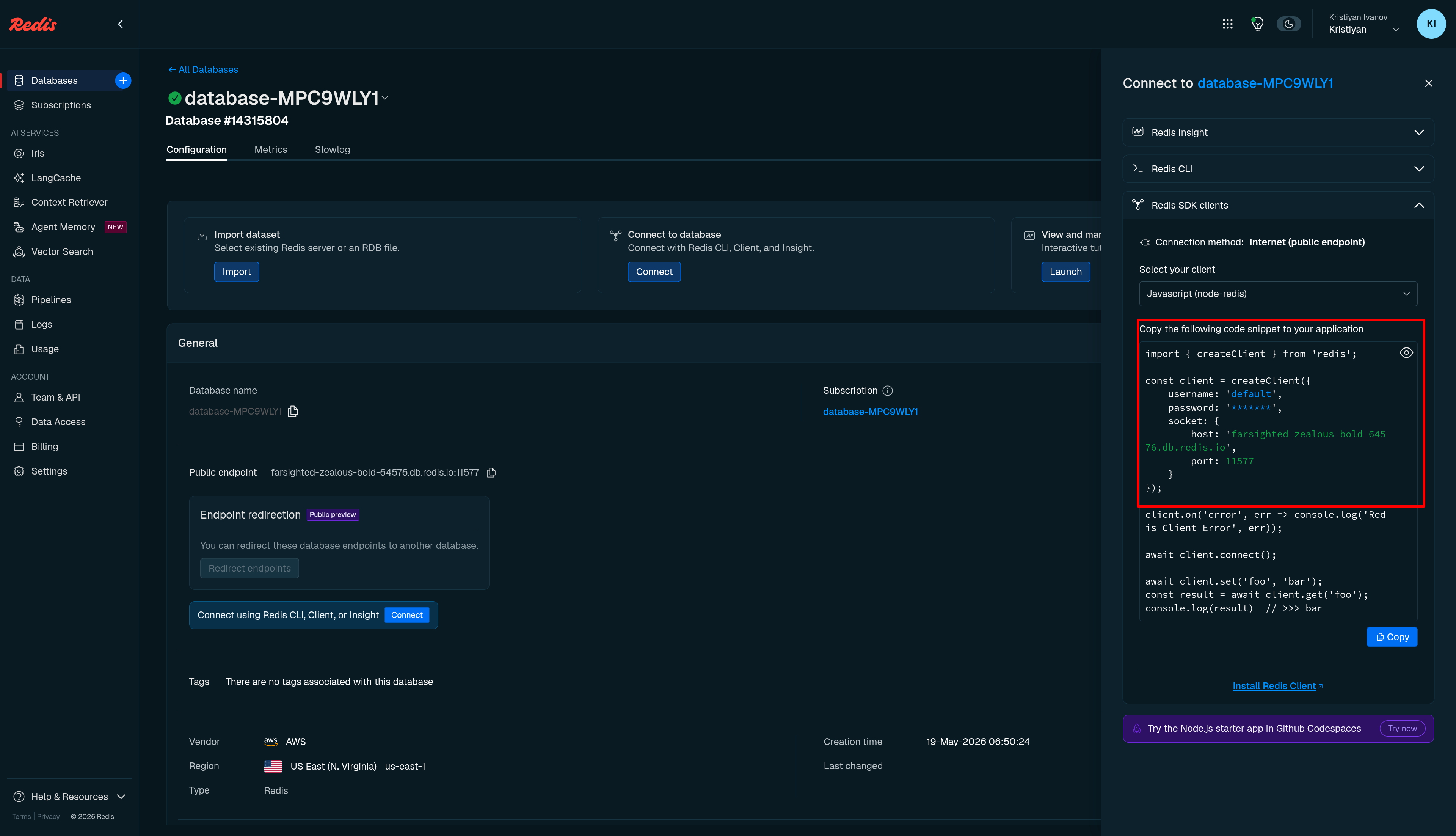
The host and port are always shown together in the Public endpoint field separated by a colon. Split them when filling in the BetterDB form.
Quick Connect
The fastest way: combine your public endpoint and password into a connection URL and paste it into the Quick connect box on the connect screen:
redis://default:YOUR_PASSWORD@farsighted-zealous-bold-64576.db.redis.io:11577
Use rediss:// (double s) instead if your database has TLS enforced (check the Security section).
Connecting via BetterDB Cloud
- In BetterDB Cloud, open the connection selector and click + Add Connection
-
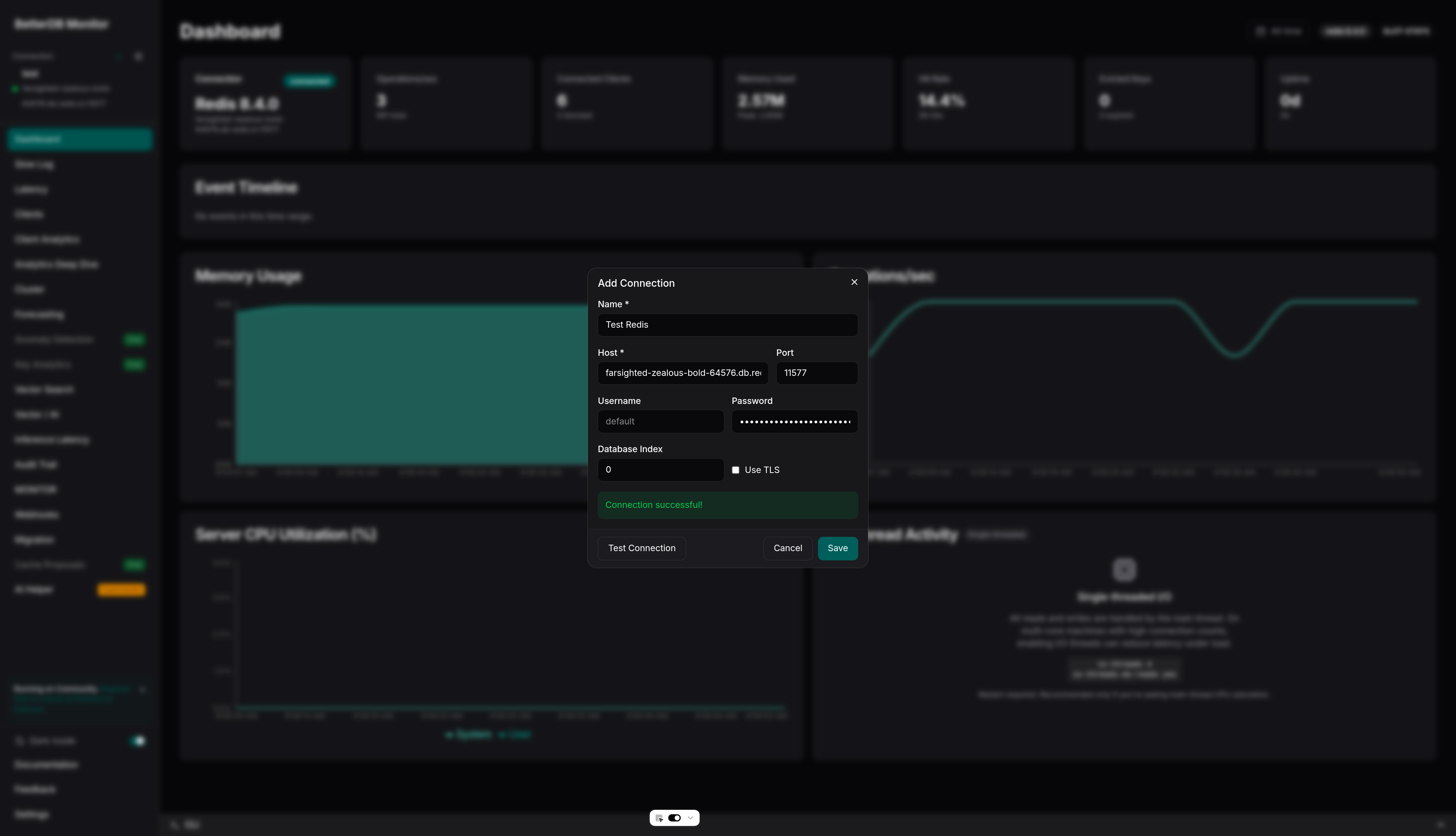
Fill in the form:
Field Value Host The hostname from the public endpoint, e.g. farsighted-zealous-bold-64576.db.redis.ioPort The port from the public endpoint, e.g. 11577Username defaultPassword Your database password (from the Connect panel) Use TLS Only if your database has TLS enforced (check the Security section) - Click Test Connection, then Save
Connecting Self-Hosted BetterDB
Via environment variables (initial connection)
docker run -d \
  --name betterdb \
  -p 3001:3001 \
  -e DB_HOST=farsighted-zealous-bold-64576.db.redis.io \
  -e DB_PORT=11577 \
  -e DB_USERNAME=default \
  -e DB_PASSWORD=your-database-password \
  -e BETTERDB_LICENSE_KEY=your-license-key \
  betterdb/monitor
Add -e DB_TLS=true if your database has TLS enforced.
Via API (additional connections)
curl -X POST http://localhost:3001/connections \
  -H "Content-Type: application/json" \
  -d '{
    "name": "Redis Cloud Production",
    "host": "farsighted-zealous-bold-64576.db.redis.io",
    "port": 11577,
    "username": "default",
    "password": "your-database-password"
  }'
What Works on Redis Cloud
| Feature | Status | Notes |
|---|---|---|
| Memory & CPU metrics | ✅ | Via INFO command |
| Key count, ops/sec, hit rate | ✅ | Via INFO |
| Slowlog | ✅ | Available on all plans |
| Key analytics (SCAN) | ✅ | SCAN is supported |
| Anomaly detection | ✅ | Based on INFO polling |
| Webhooks & alerts | ✅ | |
| Migration (source or target) | ✅ | All data types supported |
| Client analytics | ✅ | CLIENT LIST is supported |
| MONITOR stream | ⚠️ | Availability depends on plan; BetterDB probes on connect |
| ACL audit trail | ⚠️ | ACL LOG availability varies by plan |
| CONFIG inspection | ⚠️ | CONFIG GET is available on some plans but not all |
| COMMANDLOG | ❌ | Valkey-only feature; not available on Redis Cloud |
BetterDB detects unavailable commands automatically - restricted panels show an explanation rather than an error.
Feature availability on managed providers changes frequently. Always consult the Redis Cloud documentation for the most up-to-date information on supported commands.
Known Limitations
Non-standard port. Redis Cloud assigns a unique high port to each database (e.g. 11577). Make sure to copy the full host:port from the Public endpoint field and split them into the separate Host and Port fields in BetterDB.
Single database only. Redis Cloud does not support multiple Redis databases (SELECT 1, SELECT 2, etc.). All data lives in database 0. BetterDB connects to database 0 by default.
TLS varies by plan. TLS is optional on some plans and enforced on others. Check your database’s Security section to confirm whether TLS is required before connecting.
Troubleshooting
| Symptom | Cause | Fix |
|---|---|---|
Connection refused | Wrong port | Copy the full public endpoint from the Configuration tab and use only the port number after the colon |
WRONGPASS invalid username-password pair | Wrong password or username | Use default as the username and the password from the Connect panel |
Connection timed out | TLS mismatch | If TLS is enforced on the database, enable Use TLS in the connection form |
| Dashboard panels show “Unavailable” | Command restricted by Redis Cloud | Expected - see the feature table above |
| MONITOR tab is empty or unavailable | Plan does not support MONITOR | Upgrade your Redis Cloud plan or use polling-based metrics instead |